| This post was kindly contributed by platformadmin.com - go there to comment and to read the full post. |
The next version of the Metacoda Security Plug-ins includes a new Capability Reviewer. This new feature provides the ability to review who has access to a specific capability and by what paths a user, group or role acquires that capability.
As an example of how this is useful I’ll step through a scenario where we want to assess what needs to be done to avoid granting a specific capability to a specific user. If you have ever tried to make sure a user doesn’t have a particular capability then I’m sure you have seen this type of scenario. Lets say Bob Baxter is our user and he has the Drill to Detail capability in SAS® Web Report Studio 4.3 but he shouldn’t have.
We have to find all the roles that provide that capability directly to him and make sure he isn’t a direct member of the role. We need to remember that capability acquisition is cumulative and capabilities can’t be denied. It only takes 1 role to provide him the capability for him to have it. He can also get access to the capability through his, possibly nested, group memberships if those groups are members of a role that provides the capability. He can also get access through capability contributions, from contributing roles, to a role he is a member of directly or indirectly.
So now lets say Bob has been removed as a direct member of any roles that provided the capability but he still has the capability. Chances are he has acquired the capability indirectly through one of the groups that he is a member of (either directly or indirectly through nested group members, or implicitly through SASUSERS or PUBLIC). That means we need to track down how those groups have the capability and either remove him from the group or remove the group from the role (taking into account removing him from the group and/or removing the group from the role could have significant impacts elsewhere).
So where do we start with this? How do you find out which users, groups and roles have access to a specific capability and how they have access to that capability? This is where the Capability Reviewer in the upcoming V2 release of our Metacoda Security Plug-ins shines. The following screenshots show how we can use the Capability Reviewer to find this information.
The first screenshot below shows the initial view of the Capability Reviewer. It shows a list of all capabilities. Clicking on a capability shows all of the users, groups and roles that have access to that capability. This is presented in a tree format on the left and a table format on the right. The tree shows the various paths from the capability, through the roles, to the groups and users (including nested groups and contributing roles). The screenshots in this post are quite small, but you can click on any of them to view them full size.
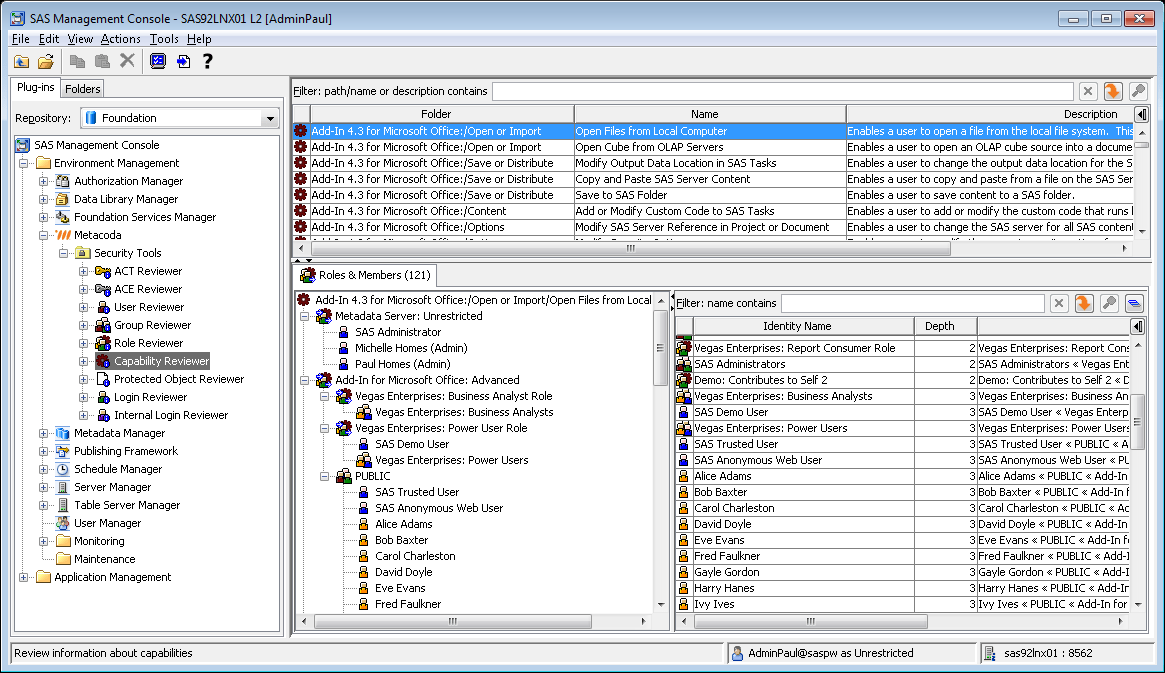
We are interested in a specific capability, so we type drill in the filter bar to limit the display to those capabilities that include the text drill in their path/name or description. The result is shown in the next screenshot …

In the screenshot above (click it to view full size) we can see the filter bar has been used to find the Drill to Detail capability in SAS® Web Report Studio 4.3. The capability has been selected and we can see in the tree and table below it who has access to that capability. There are quite a few identities listed, but we are interested in a specific user (Bob). The next screenshot shows how we can look specifically at Bob’s access to that capability …

In the screenshot above (click it to view full size) we can see the filter bar within the Roles & Members tab, has been used to find Bob. By default the tree and table only show the shortest path by which the user acquires that capability, but if we want to ensure a user doesn’t have a capability we need to find and eliminate all capability access paths for that user, so we also click the “Show Duplicates” button on the filter bar. The table then shows all 3 paths by which Bob acquires the Drill to Detail capability.
As you can see the Capability Reviewer allows us to find exactly how Bob acquires the capability through all of the potential paths. To make sure he doesn’t have the capability we need to ensure he is not in any of these paths. How that is done for you will depend on how you have set up your groups, roles and capabilities within your SAS platform installation. The simplest way will be to either remove Bob from the relevant roles and/or groups, or remove the capability from the relevant role(s). However, we also need to bear in mind that, depending on the changes you make, this can have significant impacts to roles, capabilities and access controls elsewhere. A more realistic outcome from a requirement to effectively remove a capability for a user is that the roles & capabilities implementation needs to be re-assessed and re-planned. Roles & capabilities needs careful planning but that’s a bigger story than we have time for here.
Our other Metacoda Security Plug-ins reviewers can help you assess the potential impact of any changes you might plan to make. For example: the Role Reviewer can help you find out what other users and groups might be affected by changes to a role’s capability set; the Group Reviewer can help you find out what other users and groups are direct or indirect members of a group you might want to change role memberships for.
If you’d like to find out more about the Capability Reviewer, or evaluate a beta version when it becomes available soon, then you can either send me a message or contact us via the Metacoda contact form.
If you are attending SAS Global Forum 2011 in Las Vegas this week then you can also see the Capability Reviewer in action by visiting us at the Metacoda booth (#106) in the demo area.
| This post was kindly contributed by platformadmin.com - go there to comment and to read the full post. |