Category: SAS

Copy an entire process flow in SAS Enterprise Guide

I’ve seen some crazy process flows in SAS Enterprise Guide. Crazy-big, and crazy-complex, used by real customers to accomplish real work. But while these process flows represent a ton of work, this is usually a calculated investment to automate processes that would be difficult to capture in another way. For […]

The post Copy an entire process flow in SAS Enterprise Guide appeared first on The SAS Dummy.

Where are different languages spoken?

As you travel around the world, do you know where English, French, Spanish, and Arabic are spoken? This blog will help you quickly answer that question, with some cool SAS maps! But first, here’s a picture of my friend Joy posing beside an interesting sign during one of her international […]

The post Where are different languages spoken? appeared first on The SAS Training Post.

Hadoop is the New Black

It feels like any SAS-related project in 2015 not using Hadoop is simply not ambitious enough. The key question seems to be “how big should our Hadoop cluster be” rather than “do we need a Hadoop cluster”.

Of course, I’m exaggerating, not every project needs to use Hadoop, but there is an element of new thinking required when you consider what data sources are available to your next project and what value would they add to your end goal. Internal and external data sources are easier to acquire, and volume is less and less of an issue (or, stated another way, you can realistically aim to acquire large and larger data sources if they will add value to your enterprise).

Whilst SAS is busy moving clients from PC to web, there’s a lot of work being done by SAS to move the capabilities of the SAS server inside of Hadoop. And that’s to minimise “data miles” by moving the code to the data rather than vice-versa. It surely won’t be long before we see SAS Grid and LASR running inside of Hadoop. It’s almost like Hadoop has become a new operating system on which all of our server-side capabilities must be available.

We tend to think of Hadoop as being a central destination for data but it doesn’t always start its presence in an organisation in that way. Hadoop may enter an organisation for a specific use case, but data attracts data, and so once in the door Hadoop tends to become a centre of gravity. This effect is caused in no small part by the appeal of big data being not just about the data size, but the agility it brings to an organisation.

SAS’s Senior Director of the EMEA and AP Analytical Platform Centre of Excellence, Mark Torr (that’s one heck of a title Mark!) recently wrote a well-founded article on the four levels of Hadoop adoption maturity based upon his experiences with many SAS customers. His experiences chime with my far more limited observations. Mark lists the four levels as:

  1. Monitoring – enterprises that don’t yet see a use for Hadoop within their organisation, or are focused on other priorities
  2. Investigating – those at this level have no clear, focused use for Hadoop but they are open to the idea that it could bring value and hence they are experimenting to see where and how it can deliver benefit(s)
  3. Implementing – the first one or two Hadoop projects are the riskiest because there’s little or no in-house experience, and maybe even some negative political undercurrents too. As Mark notes, the exit from Investigating into Implementing often marks the point where enterprises choose to move from the Apache distribution to a commercial distribution that offers more industrial-strength capabilities such as Hortonworks, Cloudera or MapR
  4. Established – At this level, Hadoop has become a strategic architectural tool for organisations and, given the relative immaturity of Hadoop, the organisations are working with their vendors to influence development towards full production-strength capabilities
Hadoop is (or will be) a journey for all of us. Many organisations are just starting to kick the tyres. Of those who are using Hadoop, most are in the early stages of this process in level 2, with a few front-runners living at level 3. Those organisations at leve 3 are typically big enough to face and invest in solutions to the challenges that the vendors haven’t yet stepped up to, such as managing provenance, data discovery and fine-grained security.

Does anybody live the dream fully yet? Arguably, yes, the internal infrastructures developed at Google and Facebook certainly provide their developers with the advantages and agility of the data lake dream. For most us, we must be content to continue our journey…


Follow me on Twitter: @aratcliffeuk

Summer of Coding

I’m always keen to encourage an awareness and uptake of coding in my kids. I think that coding brings a lot more than the simple ability to write programs. Coding requires a set of disciplines and an approach that are of great benefit in all walks of life.

As the summer holidays are upon us, with weeks upon weeks for kids to idle away their time, now is a good moment to revisit some of the online opportunities to give kids an insight into the joys of coding.

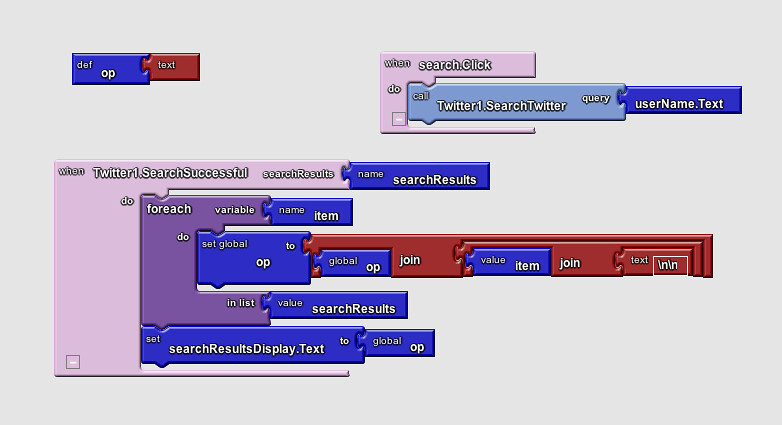
I’ve previously mentioned Scratch and App Inventor 2 (AI2) as two very accessible means for getting kids (and adults!) started, and producing a useful app that they can share with their friends very quickly. Both sites are free and use a clever building blocks interface to allow budding programmers to quickly understand the requirements of syntax. Scratch builds web-based apps and AI2 builds apps for Android devices (phones and tablets) with surprisingly powerful blocks for accessing web-based resources.

Scratch has always encouraged its users to share their work. Earlier this year App Inventor added its own gallery for showing and sharing.

Whilst it’s not free, I’ve heard good things about Tynker. Tynker also takes the building blocks approach to syntax, and offers structured courses to help guide its students to exciting results.

Another means of getting your kids inspired is Lightbot. This is a series of programming-related puzzles featuring a cute robot character in a games app – available for Apple iOS, Android and other platforms. Great fun, and challenging too when you get to some of the higher levels.

As technology becomes more pervasive, traditional trades disappear, and the world of work becomes more globalised, the skills that newer members of the workforce need are changing: problem solving, team working, and communication are but three “21st century skills”. Digital literacy (ability to find and use internet-based resources and information) and creativity— and the latter’s close relative, entrepreneurship—are close behind. And, the young have become more comfortable learning on their own, especially on topics of interest. They just need to be pointed in the right direction!


Follow me on Twitter: @aratcliffeuk

Finding July 4th fireworks shows with SAS software!

A friend who recently moved to North Carolina from the west coast asked, “What’s there to do around here for the July 4th holiday?” So I created a fireworks map, showing the locations of many of the celebrations around the state! Here’s a snapshot of my map – click on it to […]

The post Finding July 4th fireworks shows with SAS software! appeared first on The SAS Training Post.

Top 3 reasons to attend Analytics 2015 in Las Vegas

I’m not a big gambler, but there is something I would put my money on – analytics. Analytics is helping companies turn information into value. And yes, I mean money. If you want to learn about the latest analytics trends and get in on some of that “value” – attend […]

The post Top 3 reasons to attend Analytics 2015 in Las Vegas appeared first on The SAS Training Post.

Hit Your IT Knowledge Targets!

What I love most about the SAS community is the willingness to share information. I asked Tom Karl – how do you stay current with the complete deluge of new tools (Hadoop, Spark) and methods that are streaming toward you all the time.  He offered some advice and then I strong-armed (playground technique!) him into writing a blog post!  And yes Tom – you are invited …

Post Hit Your IT Knowledge Targets! appeared first on BI Notes for SAS® Users. Go to BI Notes for SAS® Users to subscribe.

[[ This is a content summary only. Visit my website for full links, other content, and more! ]]

More Flash in Chrome for Less Power … and the HTML5 Migration

If you use one of SAS’s web interfaces you’ll be a great fan of the flexibility and usability of the user interface. And those capabilities are probably provided by Adobe Flash. Your browser is running the Flash plug-in.

But Flash has one or two downsides, principally its tendency to use lots of CPU cycles which in-turn uses lots of battery power. Not a problem maybe if you’re hooked to the mains, but not good on a laptop of mobile phone/tablet.

If you use the Chrome browser you’ll be pleased to hear that Google are improving Chrome’s power consumption when Flash is running. When you’re on a webpage that runs Flash, Chrome will intelligently pause content, e.g. Flash animations, that aren’t central to the webpage, while keeping central content (like a video) playing without interruption. If Chrome accidentally pause something you were interested in, you can just click it to resume playback. This update significantly reduces power consumption, allowing us to do analytics on-the-go for longer before having to hunt for a power outlet.

This feature was enabled by default on Chrome’s desktop Beta channel in June, and will be rolling out soon to everyone else on Chrome desktop.

Looking longer-term, SAS are replacing their use of Flash with HTML5. Whilst the use of Flash requires a plug-in from Adobe, HTML5 is supported by all modern browsers out-of-the-box, with no need for any plug-in. The majority of web sites and vendors are migrating to HTML5 due to its net neutrality and power-consumption benefits. SAS Studio already uses HTML5; Visual Analytics and Visual Statistics currently use Flash. We can expect a migration to HTML5, perhaps starting with the VA hub this summer, which will probably be complete next year.


Follow me on Twitter: @aratcliffeuk