Category: SAS

Wanted! SAS Rustlers Unite at #SASGF15 #TweetUp

In April 2015, SAS users travel across the world to the SAS Global Forum in Dallas, Texas – yes the legendary Wild West.  If you are arriving early at the conference (maybe for a workshop or to take a certification exam) – then you’re invited to a special and exclusive event.


#SASGF15 Tweeps Unite!

This is an informal, pre-conference gathering for tweeps on Saturday 25th April at 8 PM at the conference hotel. …

Post Wanted! SAS Rustlers Unite at #SASGF15 #TweetUp appeared first on BI Notes for SAS® Users. Go to BI Notes for SAS® Users to subscribe.

[[ This is a content summary only. Visit my website for full links, other content, and more! ]]

Can you learn how to create custom tasks?

To develop a custom task for use in SAS Enterprise Guide (or SAS Add-In for Microsoft Office), you need a few things: A working knowledge of SAS and SAS Enterprise Guide Microsoft Visual Studio (the free Express edition will do, though the Professional edition is better) Some experience with C# […]

The post Can you learn how to create custom tasks? appeared first on The SAS Dummy.

Config Notes: SAS Mid-Tier (Linux) IWA with Fallback

Continuing on the theme of configuring a SAS 9.4 M2 platform on Linux to use Integrated Windows Authentication (IWA), in this post I’m going to jot down some notes on steps 12-15 – configuring the SAS mid-tier on a Linux server for IWA with fallback to form-based authentication (when IWA is not available). This includes […]

Migrating code pieces to GitHub

One of the original reasons for this blog was to keep track of my SAS code as well as its relevant context. That was the mindset when I was a SAS analyst, but now working in professional software company, using the right tool for versioning, col…

Party like it’s 19999 (SAS)

On 03OCT2014 I must have missed the party in Cary, NC. data _null_; format date date9.; date = 19999; put date=;run; So the next party is 03JUN2568? data _null_; format date date9.; date = 222222; put date=;run;For more posts like this, see Heuristic …

Solve the Top N questions in SAS/SQL

This is a following post after my previous post about SAS/SQL.
SAS’s SQL procedure has a basic SQL syntax. I found that the most challenging work is to use PROC SQL to solve the TOP N (or TOP N by Group) questions. Comparing with other modern database systems, PROC SQL is lack of –
  • The ranking functions such as RANK() or the SELECT TOP clause such as
    select TOP 3 * 
    from class
    ;

  • The partition by clause such as
    select sex, name, weight
    from (select sex, name, max(weight) over(partition by sex) max_weight
    from class)
    where weight = max_weight
    ;

However, there are always some alternative solutions in SAS. I list a few question from an ascending difficulty below to explore the possibilities.
Prepare the data
First a SASHELP.CLASS dataset is used as a demo (availabe for every SAS copy). It is a small weight and height dataset from a faked class of 19 children. Now I only keep the weight variable as target column.
data class;
set sashelp.class;
keep name sex weight;
run;

proc sort;
by descending weight;
run;
Name Sex Age Weight
Philip M 16 150
Ronald M 15 133
Robert M 12 128
Alfred M 14 112.5
Janet F 15 112.5
Mary F 15 112
William M 15 112
Carol F 14 102.5
Henry M 14 102.5
John M 12 99.5
Barbara F 13 98
Judy F 14 90
Thomas M 11 85
Jane F 12 84.5
Alice F 13 84
Jeffrey M 13 84
James M 12 83
Louise F 12 77
Joyce F 11 50.5
1. Select highest value
It is straightforward to use the outobs option at the begining to single out the highest weight.
title "Select highest weight overall";
proc sql outobs = 1;
select name, weight
from class
order by weight desc
;quit;
Name Weight
Philip 150
2. Select second highest value
How about the second highest weight? The logic is simple — if we remove the highest weight first, then the second highest weight will take the first row.
title "Select second highest weight overall";
proc sql outobs = 1;
select name, weight
from class
where weight not in (select max(weight) from class)
order by weight desc
;quit;
Name Weight
Ronald 133
3. Select Nth highest value
Now it comes to the hard part. How about the Nth highest value, say, the fourth highest weight? Now we have to do a self-joining to let the distinct value point to 3. Since there are two children with the weight 112.5, the query returns the two tied names.
title "Select Nth highest weight";
%let n = 4;

proc sql;
select distinct a.name, a.weight
from class as a
where (select count(distinct b.weight)
from class as b
where b.weight > a.weight
)
= &n - 1;
quit;
Name Weight
Alfred 112.5
Janet 112.5
4. Select highest values by group
There are two groups Male and Female in the class, and the easiest way to find the highest weight for each category is select max for female union select max for male. However, a more scalable solution is to use the group by clause that fits more than two groups.
title "Select highest weights by group";
proc sql;
select sex, name, weight
from class
group by sex
having weight
= max(weight)
;quit;
Sex Name Weight
F Janet 112.5
M Philip 150
5. Rank all values
The ultimate solution to solve all the question above is to derive a rank column for the target. There are two solutions: the first one use a subquery in the select clause, while the second one utilizes a subquery in the where clause.
The subquery in the first solution is independent to the main query, which uses less codes and is easier to recall in practice. The second one is actually a self-joining that is faster than the first solution.
/* Solution I */
proc sql;
select name, weight, (select count(distinct b.weight)
from class as b where b.weight >
= a.weight) as Rank
from class as a
order by rank
;quit;

/* Solution II */
proc sql;
select a.name, a.weight, count(b.weight) as rank
from class as a, (select distinct weight
from class
) as b
where a.weight <
= b.weight
group by a.name, a.weight
order by a.weight desc
;quit;
Name Weight Rank
Philip 150 1
Ronald 133 2
Robert 128 3
Alfred 112.5 4
Janet 112.5 4
Mary 112 5
William 112 5
Henry 102.5 6
Carol 102.5 6
John 99.5 7
Barbara 98 8
Judy 90 9
Thomas 85 10
Jane 84.5 11
Alice 84 12
Jeffrey 84 12
James 83 13
Louise 77 14
Joyce 50.5 15
6. Select top N values by group
Once with the rank column at hand, many perplexing problems could be easily solved. For example, we can use it to find the top 3 heaviest people for each category of male and female. And it is also scalable to more than two groups.
title "Select Top N weights by group";
proc sql;
select a.sex, a.name, a.weight, (select count(distinct b.weight)
from class as b where b.weight >
= a.weight and a.sex = b.sex ) as rank
from class as a
where calculated rank <
= 3
order by sex, rank
;quit;
Sex Name Weight rank
F Janet 112.5 1
F Mary 112 2
F Carol 102.5 3
M Philip 150 1
M Ronald 133 2
M Robert 128 3

Deploy a MongoDB powered Flask app in 5 minutes

This is a quick tutorial to deploy a web service (a social network) by the LNMP (Linux, Nginx, MongoDB, Python) infrastructure on any IaaS cloud. The repo at Github is at https://github.com/dapangmao/minitwit-mongo-ubuntu.

Stack

The stack is built on the tools in the ecosystem of Python below. 

Tool Name Advantage
Cloud DigitalOcean Cheap but fast
Server distro Ubuntu 14.10 x64 Everything is latest
WSGI proxy Gunicorn Manage workers automatically
Web proxy Nginx Fast and easy to configure
Framework Flask Single file approach for MVC
Data store MongoDB No scheme needed and scalable
DevOps Fabric Agentless and Pythonic
In addition, a Supervisor running on the server provides a daemon to protect the Gunicorn-Flask process.

The MiniTwit app

The MiniTwit application is an example provided by Flask, which is a prototype of Twitter like multiple-user social network. The original application depends on SQLite. However, the data store could be modified to fit the category of NoSQL such as Google Data Store or MongoDB. A live MintiTwit demo is hosted at http://minitwit-123.appspot.com/public

Deployment

1. Install Fabric and clone the Github repo
The DevOps tool is fabric that is simply based on SSH. The fabfile.py and the staging flask files are stored on Github. We should install fabric and download the fabfile.py on the local machine before the deployment.
sudo pip install fabric 
wget https://raw.githubusercontent.com/dapangmao/minitwit-mongo-ubuntu/master/fabfile.py
fab -l
2. Enter IP from the virtual machine
A new VM from ausually emails IP address and the root password. Then we could modify the head part of the fabfile.py accordingly. There are quite a less expensive cloud providers for prototyping other than the costly Amazon EC2. For example, a minimal instance from DigitalOcean only costs five dollars a month. If SSH key has been uploaded, the password could be ignored.
env.hosts = ['YOUR IP ADDRESS'] #  Enter IP
env.user = 'root'
env.password = 'YOUR PASSWORD' # Enter password
3. Fire up Fabric
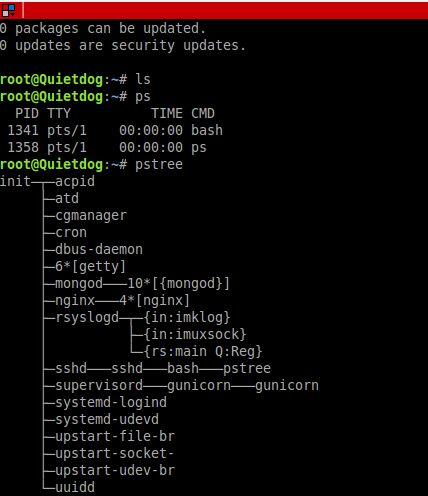
Now it is time to formally deploy the application. With the command below, the fabric will first install pip, git, nginx, gunicorn, supervisor and the latest MongodB, and configure them sequentially. In less than 5 minutes, a Flask and MongoDB application will be ready for use. Since DigitalOcean has its own software repository for Ubuntu, and its VMs are on SSD, the deployment is even faster, which is usually finished in one minute.
fab deploy_minitwit

2015.2: Did the New England Patriots experience a decrease in fumbles starting in 2007?

Here’s a timely guest entry from Jeffrey Witmer (Oberlin College).

As the “Deflate Gate” saga was unfolding, Warren Sharp analyzed “touches per fumble” for NFL teams before and after 2006, when a rule was changed so that teams playing on the road could provide their own footballs (http://www.sharpfootballanalysis.com/blog/). Sharp noted that, for whatever reason, the Patriots went from being a typical team, as regards fumbling, to a team with a very low fumble rate. Rather than rely on the data the Sharp provides at his website, I choose to collect and analyze some data on my own. I took a random sample of 30 games played by New England and 30 other games. For each game, I recorded all rushing and passing plays (except for QB kneels), but excluded kicking plays (the NFL, rather than the teams, provides special footballs for those plays). (Data source: http://www.pro-football-reference.com/play-index/play_finder.cgi.) I also recorded the weather for the game. (Data source: http://www.wunderground.com/history/.) Once I had the data (in a file that I called AllBig, which can be downloaded from http://www.amherst.edu/~nhorton/AllBig.csv), I noted whether or not there was a fumble on each play, aided by the grep() command:


grep("Fumb", AllBig$Detail, ignore.case=TRUE)

I labeled each play as Late or not according to whether it happened after the rule change:


AllBig$Late 2006, 1, 0)

Now for the analysis. My data set has 7558 plays including 145 fumbles (1.9%). I used the mosaic package and the tally() command to see how often teams other than the Patriots fumble:


require(mosaic)
tally(~Fumble+Late, data=filter(AllBig,Pats==0))

Late
Fumble 0 1
0 2588 2919
1 54 65

Then I asked for the data in proportion terms:


tally(Fumble~Late, data=filter(AllBig,Pats==0))

and got


Late
Fumble 0 1
0 0.9796 0.9782
1 0.0204 0.0218

For non-Pats there is a tiny increase in fumbles. This can be displayed graphically using a mosaiplot (though it’s not a particularly compelling figure). mosaicplot(Fumble~Late, data=filter(AllBig,Pats==0)) Repeating this for the Patriots shows a different picture:


tally(~Fumble+Late, data=filter(AllBig,Pats==1))
Late
Fumble 0 1
0 996 910
1 19 7


tally(Fumble~Late, data=filter(AllBig,Pats==1))
Late
Fumble 0 1
0 0.98128 0.99237
1 0.01872 0.00763

I fit a logistic regression model with the glm() command: glm(Fumble~Late*Pats, family=binomial, data=AllBig)


Coefficients:
Estimate Std. Error z value Pr(>|z|)
(Intercept) -3.8697 0.1375 -28.14 Late 0.0650 0.1861 0.35 0.727
Pats -0.0897 0.2693 -0.33 0.739
Late:Pats -0.9733 0.4819 -2.02 0.043 *

I wanted to control for any weather effect, so I coded the weather as Bad if it was raining or snowing and good if not. This led to a model that includes BadWeather and Temperature – which turn out not to make much of a difference:


AllBig$BadWeather
glm(formula = Fumble ~ BadWeather + Temp + Late * Pats,
family = binomial, data = AllBig)

Coefficients:
Estimate Std. Error z value Pr(>|z|)
(Intercept) -4.23344 0.43164 -9.81 BadWeather 0.33259 0.29483 1.13 0.26
Temp 0.00512 0.00612 0.84 0.40
Late 0.08871 0.18750 0.47 0.64
Pats -0.14183 0.27536 -0.52 0.61
Late:Pats -0.91062 0.48481 -1.88 0.06 .

Because there was suspicion that something changed starting in 2007 I added a three-way interaction:


glm(formula = Fumble ~ BadWeather + Temp + IsAway * Late * Pats,
family = binomial, data = AllBig)

Coefficients:
Estimate Std. Error z value Pr(>|z|)
(Intercept) -4.51110 0.47707 -9.46 BadWeather 0.34207 0.30013 1.14 0.254
Temp 0.00831 0.00653 1.27 0.203
IsAway 0.14791 0.27549 0.54 0.591
Late 0.13111 0.26411 0.50 0.620
Pats -0.80019 0.54360 -1.47 0.141
IsAway:Late -0.07348 0.37463 -0.20 0.845
IsAway:Pats 0.94335 0.63180 1.49 0.135
Late:Pats 0.51536 0.71379 0.72 0.470
IsAway:Late:Pats -3.14345 1.29480 -2.43 0.015 *

There is some evidence here that the Patriots fumble less than the rest of the NFL and that things changed in 2007. The p-values above are based on asymptotic normality, but there is a cleaner and easier way to think about the Patriots’ fumble rate. I wrote a short simulation that mimics something I do in my statistics classes, where I use a physical deck of cards to show what each step in the R simulation is doing.


#Simulation of deflategate data null hypothesis
Late = rep(1,72) #creates 72 late fumbles
Early = rep(0,73) #creates 73 early fumbles
alldata = append(Late,Early) #puts the two groups together
table(alldata) #check to see that we have what we want

cards =1:length(alldata) # creates 145 cards, one "ID number" per fumble

FumbleLate = NULL # initializes a vector to hold the results
for (i in 1:10000){# starts a loop that will be executed 10,000 times
cardsgroup1 = sample(cards,119, replace=FALSE) # takes a sample of 119 cards
cardsgroup2 = cards[-cardsgroup1] # puts the remaining cards in group 2
NEPats = (alldata[cardsgroup2]) #reads the values of the cards in group 2
FumbleLate[i] = sum(NEPats) # counts NEPats late fumbles (the only stat we need)
}

table(FumbleLate) #look at the results
hist(FumbleLate, breaks=seq(2.5,23.5)) #graph the results

sum(FumbleLate

Additional note: kudos to Steve Taylor for the following graphical depiction of the interaction.

An unrelated note about aggregators:We love aggregators! Aggregators collect blogs that have similar coverage for the convenience of readers, and for blog authors they offer a way to reach new audiences. SAS and R is aggregated by R-bloggers, PROC-X, and statsblogs with our permission, and by at least 2 other aggregating services which have never contacted us. If you read this on an aggregator that does not credit the blogs it incorporates, please come visit us at SAS and R. We answer comments there and offer direct subscriptions if you like our content. In addition, no one is allowed to profit by this work under our license; if you see advertisements on this page, the aggregator is violating the terms by which we publish our work.