Indian Baby Population in US by State

Folks, I was going thru few visualizations on Tableau’s website today and I came across this visualization Exploring the SSA Baby Names Dataset by one of the acclaimed Tableau professional….It made me thinking to explore of How many of those SSA baby names are of Indian American (Desi) descent…

I found a website online that had a list of popular Indian baby names…I read the data into SAS and made a Tableau Story out of it… Please take a few moments to play with this interesting viz…I hope you like it….
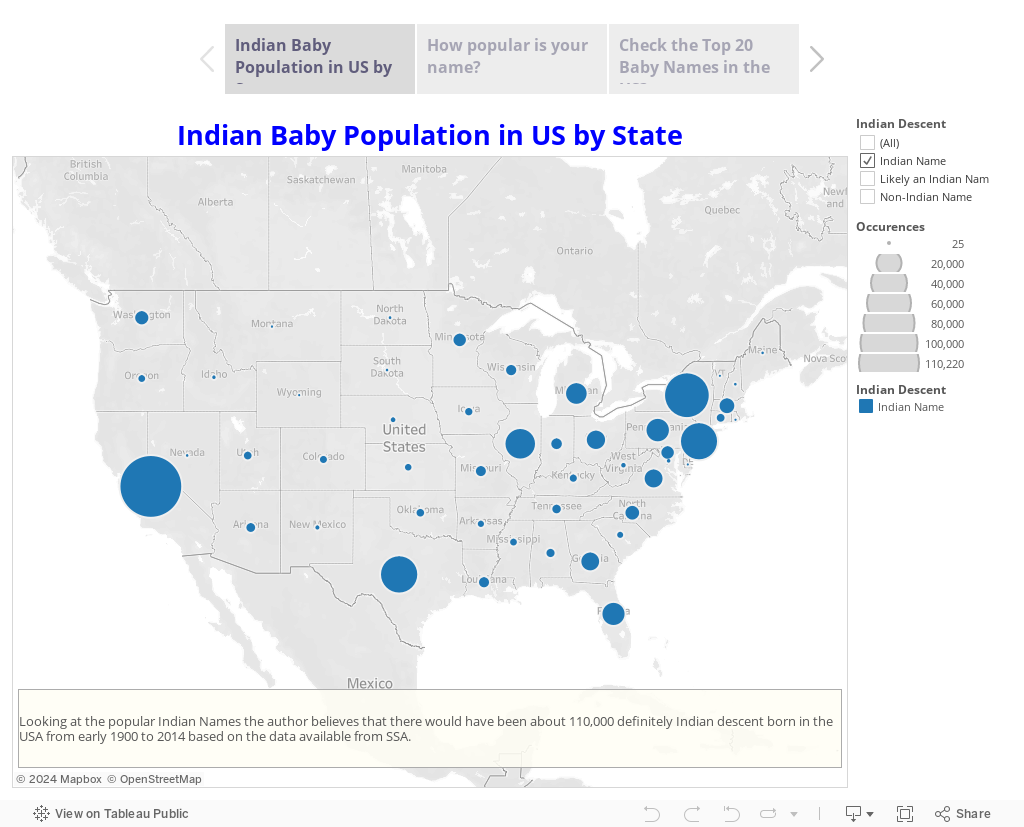
Exploring Indian Baby Names from SSA Data

Here’s the SAS code that went into the prep of the data…

/*Read Indian Baby Names by parsing the http URL */

libnamesharad “C:UsersSharadDesktopnamesbystate”;

%macroloop(type);

proc sql; drop table name; quit;

%doi=1 %to 60;

filename foo url

    “http://www.modernindianbabynames.com/modern_baby_name/starting_with/ANY/MF/Sikh/1560/&i.”;


data _null;

retain start recind recst recend hier;

length SN Name Meaning Gender Origin $ 100;

retain SN Name Meaning Gender Origin;

   infile foo length=len;

   input record $varying200.len;

   put record $varying200.len;

   if index(record,) then start=1;

   if index(record,

) then start=0;

   if index(record,) then delete;

   if index(record,

) then do; recvalst=1; hier+1;; end;

   if index(record,

) then do; recvalend=1; delete; end;

   if index(record,‘ ‘ ) then do; recst=1; hier=0;delete; end;

   if index(record,

) then do; recst=0; hier=0;; end;


      if hier=1then do; record=tranwrd(record,

,); SN=strip(record); end;

      else if hier=2then do; record=tranwrd(record,

,); Name=strip(record); end;

      else if hier=3then do; record=tranwrd(record,

,); Meaning=strip(record); end;

      else if hier=4then do; record=tranwrd(record,

,); Gender=strip(record); end;

      else if hier=5then do; record=tranwrd(record,

,); Origin=strip(record); end;

      record=tranwrd(record,

,);

      record=tranwrd(record,

,);

      record=strip(record);

   if index(record,

) and start then do; recend=1; hier=0; output; end;

   else delete;  

   keep SN Name Meaning Gender Origin;

run;

OPTION SPOOL;

proc append data=_null base=sharad.&type force; run;

%end;

%mendloop;

%loop(Hindi);

/*

Make a list of Indian Names that definetly sound Indian or Closely Indian

Y – Yes

P – Indian Possibility

*/

dataSharad.Def_IndiaNames;

infilecards4 dlm=’09’xmissover;

lengthName $ 100 IndianorNot $ 1;

inputName IndianorNot;

Name=strip(propcase(Name));

cards;

Name  Indian

Tina  P

Tanya P

Maya  P

Trisha      Y

Nadia P

Amir  P

Aisha P

Tanisha     P

Chandra     P

Chaya P

Rohan Y

—-and 1000’s of other records—

;

run;

/*

Join all available Indian Names

*/

dataSharad.ALLNames;

setSharad.telugu

 sharad.bengali sharad.hindi sharad.sikh;

 Name=translate(Name,,“‘”);

 ifcompress(Name)= thendelete;

 dropSNO SN;

run;

/*

Remove Dups

*/

procsort data=Sharad.ALLNames noduprecsby Name; run;

/*

Re-purpose the data a bit

*/

dataSharad.IndianNames(rename=(dMeaning=Meaning dGender=IGender dOrigin=Origin));

lengthdMeaning $ 100 dGender $15dOrigin $ 100;

retaindMeaning dGender dOrigin;

setSharad.ALLNames;

byName;

if  first.name then

do;

dMeaning=;

dOrigin=;

dGender=;

end;

ifindex(strip(dMeaning),strip(Meaning)) eq 0then  dMeaning=catx(‘ OR ‘,strip(dMeaning),strip(Meaning));

ifindex(strip(dOrigin),strip(Origin)) eq 0then  dOrigin=catx(‘ ,’,strip(dOrigin),strip(Origin));;

ifindex(strip(dGender),strip(Gender)) eq 0then  dGender=catx(‘ OR ‘,strip(dGender),strip(Gender));;

ifdGender in (“Boy OR Girl”,“Girl OR Boy”) thendGender=“Boy OR Girl”;

dGender=strip(dGender);

if  last.name thenoutput;

keepName dMeaning dGender dOrigin;

run;

/*

Read US Gov SSA Baby Names data fields

*/

filenameallst “C:UsersSharadDesktopnamesbystateallallstates.txt”;

dataSharad.USNames;

infileallst dlm=‘,’dsd missoverfirstobs=2;

lengthState $ 2 Gender $1Year $4 Name $ 50;

inputState Gender Year Name Occurences;

run;

/*

Merge US Gov SSA Baby Names data with Indian Names Data

*/

procsql;

createtable sharad.IndNames as

selectA.*,IGender,Meaning,Origin

fromSharad.USNames A

leftjoin Sharad.IndianNames B

onA.name=B.name

orderby A.name;

quit;

/*

Merge US Gov SSA Baby Names data with Hand picked Indian Data

*/

procsql;

createtable sharad.DefinitelyIndian as

selectA.*,

case

whenA.name=B.name and IndianorNot=‘Y’then ‘Indian Name’

whenA.name=B.name and IndianorNot=‘P’then ‘Likely an Indian Name’

else‘Non-Indian Name’

endas IndianDescent length=10

fromsharad.IndNames A

leftjoin Sharad.Def_IndiaNames B

onA.name=B.name

;

quit;

Sending Email from within SAS and other options…

Sending Email from within SAS and other options…

FILENAME Statement EMAIL (SMTP) Access Method allows you to send electronic mail programmatically from SAS using the SMTP (Simple Mail Transfer Protocol) e-mail interface available at your site.

But before you process the email code below check the values for the system options using Proc options for EMAILAUTHPROTOCOL, EMAILHOST, EMAILPORT, EMAILID, EMAILPW for your site…They have to have appropriate values for your code to work.

Read more about them @ System Options That Control SMTP E-Mail.

proc options group=email; run;


The Log generated…

59   proc options group=email; run;
    SAS (r) Proprietary Software Release 9.1  TS1M3
 EMAILAUTHPROTOCOL=LOGIN
                   Identifies the SMTP e-mail authentication protocol
 EMAILHOST=xxx.xx.xx.xxx
                   SMTP server host for email access method
 EMAILID=xxxxxx    From E-mail address, log in id, or profile for use with underlying e-mail
                   system
 EMAILPORT=25      Port number for SMTP server for email access method
 EMAILPW=xxxxxxxx  Used by the E-mail Access Method and Send menu item to set the email session
                   login password for the underlying e-mail system
 EMAILDLG=native   Used by Send menu item to set the email dialog interface.
 EMAILSYS=smtp     Used by E-mail Access Method and Send menu item to set the interface type with
                   underlying e-mail system.
Try the following email example for sending an email using SAS data step…replace emails and the attachments as you wish…This example has the most common options that you might use….Please look at the SAS examples in the References (5-7) below for some more advanced methods….
filenameoutbox email “sastechiesblog@gmail.com”;

data_null_

   fileoutbox 

      to=(“sastechiesblog@gmail.com”“info@sastechies.com”

         /* Overrides value in filename statement */ 

      cc=(“info@sastechies.com”“someone@mail.com”

      subject=“My SAS Output” 

      attach=(“C:sasresults.out”“C:sascode.sas”)

   ; 

   put‘Folks,’

   put‘Attached is my output from the SAS’

   put‘It worked great!’;

run;

Here is another way of sending emails using SAS X command in a Unix Environment that has the mailx utility…Sometimes it might just better to use the native operating system utilities rather than using SAS Filename Email Statement…
Here’s a macro that does that for you…
%macroSendEmail;

/*Write the contents to a file */

 data _null_;

   file “&emailfile”lrecl=256;

   %emailbody;

 run;


   /* %put to=&to cc=&cc subject=&subj attach=”&attach”; */


   /*use the X command and invoke the Unix mailx command */


   X “(cat &emailfile;) | mailx -s “”&subj”” &to –c &cc”;

   X ” if [[ $? -ne 0 ]] then echo `date`” “Failed to send email to &to” “else rm ~/&emailfile fi”;

%mendSendEmail;

%letsubj=Hey SASTechies;

%letto=sastechiesblog@gmail.com;

%letattach=;

%letcc=;

%letemailfile=~/email.dat; /* path to the temporary file at home directory (ie. ~) */

%macroemailbody;

  PUT “This is a test message from SASTechies”;

  PUT “This test mail has been generated from SAS Data Step using Native Unix Mail command”;

%mendemailbody;

%SendEmail;

A brief explanation here…

Enter your email/attachment/subject in the macro variables…the &emailfile is a temporary file that SAS writes to compile the email body…This is later deleted if SAS was successful in sending the email…

   X “(cat &emailfile;) | mailx -s “”&subj”” &to –c &cc”;

The unix command cat &emailfile writes the body for the mailx unix command that takes –s option for subject followed by the to and cc options. 

Check the unix man page screenshot below for more options…

sas email

Other References

What’s the most popular surname in your country?

My previous blog was about popular first names … now for a blog about popular surnames (ie, last/family names)! But before we get started, here’s a little pop-quiz – what country is my friend Mr. Foley’s surname from? I recently saw the following interesting map on dadaviz.com. It shows the most […]

The post What’s the most popular surname in your country? appeared first on The SAS Training Post.

Weird PROC FREQ trick

Default PROC FREQ output looks like this: Suppose you don’t want the two cumulative statistic columns above.  No problem.  Those can be suppressed with the NOCUM option on the TABLE statement, like this: proc freq data=sashelp.shoes; table product / nocum; run; Now your output looks like this, but you lose […]

The post Weird PROC FREQ trick appeared first on The SAS Training Post.