Click HereThe following codes are copied from the above link.options ls=132 ps=53 nocenter;*****************************************************************;* SF36V2-4_PUBLIC.SAS* SAS CODE FOR SCORING 36-ITEM HEALTH SURVEY VERSION 2.0* STANDARD FORM (N…
Put distinct values of a variable in a SAS dataset to a macro variable
Here’s a macro that can put distinct values of a variable in a SAS dataset to a macro variable of your choice.%macroput_distinct_varvalues_in_list(dsn,var,mac_var,dlm=comma,quotes=double); %global&mac_var.; …
%HPGLIMMIX SAS macro is available online at JSS website
My paper “%HPGLIMMIX: A High-Performance SAS Macro for GLMM Estimation” is now available at Journal of Statistical Software website @here.SAS macro and code can also be found there. If you use it, please kindly send me an email so that I know my work i…
Example 2014.8: Estimate power for an interaction, by simulation
In our last entry, we demonstrated how to simulate data from a logistic regression with an interaction between a dichotomous and a continuous covariate. In this entry we show how to use the simulation to estimate the power to detect that interaction. …
Example 2014.7: Simulate logistic regression with an interaction
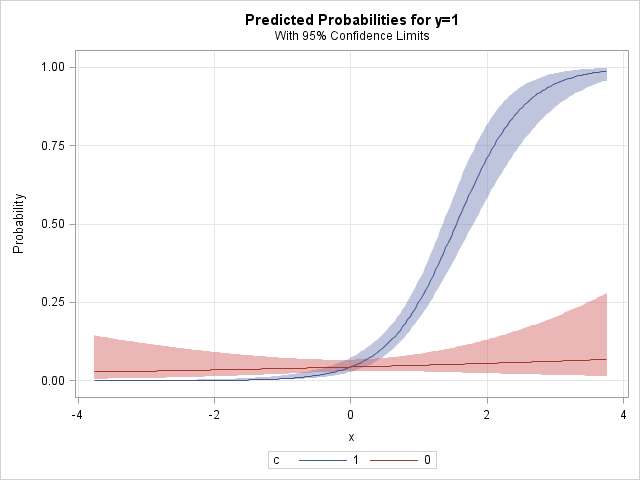
Reader Annisa Mike asked in a comment on an early post about power calculation for logistic regression with an interaction.
This is a topic that has come up with increasing frequency in grant proposals and article submissions. We’ll begin by showing how to simulate data with the interaction, and in our next post we’ll show how to assess power to detect the interaction using simulation.
As in our earlier post, our method is to construct the linear predictor and the link function separately. This should help to clarify the roles of the parameter values and the simulated data.
SAS
In keeping with Annisa Mike’s question, we’ll simulate the interaction between a categorical and a continuous covariate. We’ll make the categorical covariate dichotomous and the continuous one normal. To keep things simple, we’ll leave the main effects null– that is, the effect of the continuous covariate when the dichotomous one is 0 is also 0.
data test;
do i = 1 to 1000;
    c = (i gt 500);
    x = normal(0);
    lp = -3 + 2*c*x;
    link_lp = exp(lp)/(1 + exp(lp));
    y = (uniform(0) lt link_lp);
 output;
end;
run;
In proc logistic, unlike other many other procedures, the default parameterization for categorical predictors is effect cell coding. This can lead to unexpected and confusing results. To get reference cell coding, use the syntax for the class statement shown below. This is similar to the default result for the glm procedure. If you need identical behavior to the glm procedure, use param = glm. The desc option re-orders the categories to use the smallest value as the reference category.
proc logistic data = test plots(only)=effect(clband);
class c (param = ref desc);
model y(event='1') = x|c;
run;
The plots(only)=effect(clband) construction in the proc logistic statement generates the plot shown above. If c=0, the probability y=1 is small for any value of x, and a slope of 0 for x is tenable. If c=1, the probability y=1 increases as x increases and nears 1 for large values of x.
The parameters estimated from the data show good fidelity to the selected values, though this is merely good fortune– we’d expect the estimates to often be more different than this.
                              Standard         Wald
Parameter     DF   Estimate      Error   Chi-Square   Pr > ChiSq

Intercept      1    -3.0258     0.2168     194.7353       x              1    -0.2618     0.2106       1.5459       0.2137
c         1    1    -0.0134     0.3387       0.0016       0.9685
x*c       1    1     2.0328     0.3168      41.1850
R
As sometimes occurs, the R code resembles the SAS code. Creating the data, in fact, is quite similar. The main differences are in the names of the functions that generate the randomness and the vectorized syntax that avoids the looping of the SAS datastep.
c = rep(0:1,each=500)
x = rnorm(1000)
lp = -3 + 2*c*x
link_lp = exp(lp)/(1 + exp(lp))
y = (runif(1000)
We fit the logistic regression with the glm() function, and examine the parameter estimates.
log.int = glm(y~as.factor(c)*x, family=binomial)
summary(log.int)
Here, the estimate for the interaction term is further from the selected value than we lucked into with the SAS simulation, but the truth is well within any reasonable confidence limit.
                Estimate Std. Error z value Pr(>|z|)
(Intercept)      -3.3057     0.2443 -13.530  as.factor(c)1     0.4102     0.3502   1.171    0.241
x                 0.2259     0.2560   0.883    0.377
as.factor(c)1:x   1.7339     0.3507   4.944 7.66e-07 ***
A simple plot of the predicted values can be made fairly easily. The predicted probabilities of y=1 reside in the summary object as log.int$fitted.values. We can color them according to the values of the categorical predictor by defining a color vector and then choosing a value from the vector for each observation. The resulting plot is shown below. If we wanted confidence bands as in the SAS example, we could get standard error for the (logit scale) predicted values using the predict() function with the se.fit option.
mycols = c("red","blue")
plot(log.int$fitted.values ~ x, col=mycols[c+1])

An unrelated note about aggregators:We love aggregators! Aggregators collect blogs that have similar coverage for the convenience of readers, and for blog authors they offer a way to reach new audiences. SAS and R is aggregated by R-bloggers, PROC-X, and statsblogs with our permission, and by at least 2 other aggregating services which have never contacted us. If you read this on an aggregator that does not credit the blogs it incorporates, please come visit us at SAS and R. We answer comments there and offer direct subscriptions if you like our content. In addition, no one is allowed to profit by this work under our license; if you see advertisements on this page, the aggregator is violating the terms by which we publish our work.
Change the process priority in SAS
This SAS code programmatically changes the process priority for the current SAS program. You may want to use this for SAS batch jobs.
For example, when I run multiprocessor jobs using Ian J. Ghent %multiThreadDataStep macro, the Windows user interface becomes less responsive and my batch job competes with other processes, but using this method addresses both issues.
Simply run the line corresponding to the desired priority level. To decrease process priority, choose one of the last two.
x "wmic.exe process where processid=""&SYSJOBID"" call setpriority 'high priority'";
x "wmic.exe process where processid=""&SYSJOBID"" call setpriority 'above normal'";
x "wmic.exe process where processid=""&SYSJOBID"" call setpriority 'normal'";
x "wmic.exe process where processid=""&SYSJOBID"" call setpriority 'below normal'";
x "wmic.exe process where processid=""&SYSJOBID"" call setpriority 'idle'";
Tested on SAS 9.4 on Windows 7 and SAS 9.3 on Windows 2008.
I don’t have SAS for Linux, but I guess it would look like this to increase the niceness and therefore reduce the process priority:
x "renice -p 16 &SYSJOBID";
For more posts like this, see Heuristic Andrew.